Maelleye: A Flowing Script Font for Modern Web Design
I was halfway through redesigning a landing page for a boutique wellness coach when I hit that familiar wall. The layout was clean, the color palette felt grounded in earth tones, and the user flow made sense. But the hero section felt flat. It lacked personality. I needed a typeface that could bridge the gap between professional credibility and human warmth without sacrificing readability on mobile devices. That is when I pulled Maelleye into the project.
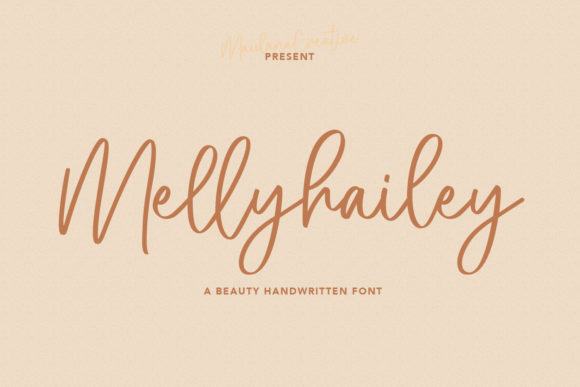
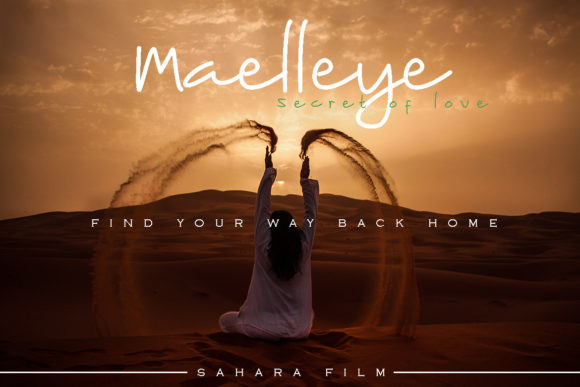
Maelleye is a simple, flowing, and adaptable script font that immediately changed the tone of the entire interface. As a digital product creator, I am always cautious about using script fonts on the web. Too often, they are difficult to read on small screens or feel too decorative to carry the weight of a headline. However, testing Maelleye revealed a different story. Its strokes are fluid but distinct, avoiding the tangled mess that plagues many handwritten styles when rendered at smaller sizes.
Testing Visual Hierarchy in the Hero Section
The first place I dropped Maelleye was the main headline. In web design, the hero section is prime real estate; it dictates whether a visitor stays or bounces. I replaced a standard geometric sans serif with Maelleye for the primary value proposition. The difference was instant. The font brought a sense of movement and elegance that static block letters simply could not match.
What makes Maelleye particularly effective for web design is its adaptability. It does not scream for attention in an aggressive way; instead, it invites the eye to follow its natural curve. This is crucial for maintaining a good user experience. When I previewed the layout on a mobile viewport, the font held up surprisingly well. The spacing between characters (kerning) felt generous enough to prevent letters from merging on high-density Retina displays, yet tight enough to maintain word cohesion.
For this specific coaching website, Maelleye served as the perfect display font. It anchored the top of the page, creating a focal point that guided the user's scanning behavior down toward the call-to-action buttons. By using a script font for the headline and a clean sans serif for the body copy, we established a clear visual hierarchy. This contrast helps users process information faster, distinguishing between emotional hooks and factual details.
Enhancing Brand Identity Across Digital Touchpoints
Beyond the homepage, I began integrating Maelleye into other areas of the brand identity. A consistent typographic voice is essential for building trust. We used the font for section dividers and short pull quotes within the blog articles. These small accents acted as decorative elements that reinforced the brand's premium feel without overwhelming the reader.
If you are working on a boutique online store or a portfolio homepage, Maelleye can be a powerful tool for product banners. Imagine a lifestyle image of a handcrafted ceramic vase with "New Collection" overlaid in Maelleye. The organic shape of the letters complements the handmade nature of the product, creating a cohesive narrative between the visual asset and the typography.
However, restraint is key. While Maelleye is versatile, it shines brightest when used for headlines, logos, and short phrases. I would advise against using it for long paragraphs of body text. On the web, readability is king. Long blocks of script text can cause eye fatigue and slow down reading speed. Instead, pair this script font with a highly legible sans serif font or a neutral serif font for the main content. This combination ensures your site looks stylish while remaining accessible to all users.
Practical Considerations for Responsive Layouts
When implementing any new typeface, technical performance and responsiveness are non-negotiable. During the development phase, I paid close attention to how Maelleye rendered across different browsers and operating systems. One of the advantages of modern font files is their optimization for the web, ensuring fast load times which directly impacts SEO and user retention.
For responsive layouts, I found that adjusting the line height was necessary when stacking Maelleye headlines on narrower screens. Script fonts often have ascenders and descenders that extend further than standard fonts, so giving them breathing room prevents clipping and improves legibility. Additionally, when placing text over image backgrounds, I ensured there was sufficient contrast. Maelleye's flowing lines can get lost against busy textures, so using a solid overlay or a drop shadow sometimes becomes necessary to maintain clarity.
This attention to detail extends to digital ads and social media graphics as well. Since Maelleye is so adaptable, it translates well from a large desktop monitor to a small Instagram story. Whether you are designing a course sales page or a promotional landing page, the font maintains its character without losing definition.
Selecting the Right Font Pairings
Finding the right partner for Maelleye was the final step in polishing the design. Because Maelleye has such a distinct personality, it pairs beautifully with minimalist fonts. I experimented with a few options before settling on a lightweight sans serif for the navigation and body text. This pairing creates a modern, editorial look that feels both sophisticated and approachable.
For a more traditional or luxury feel, you might consider pairing it with a classic serif font. This works exceptionally well for editorial design projects or high-end packaging design concepts that need to translate to digital formats. The goal is to let Maelleye be the star of the show while the supporting typography handles the heavy lifting of information delivery.
Finalizing the Asset Library
Before handing off the project, I reviewed the licensing and file formats to ensure everything was compliant for commercial use. Whether you are a freelancer managing client projects or a founder building your own digital brand kit, checking the license is a critical step. Maelleye is designed to be a reliable asset for various creative ideas, but understanding its usage rights for webfonts, apps, and merchandise is essential.
In the end, adding Maelleye to this project did more than just make the site look pretty. It elevated the entire user experience. It turned a standard informational page into a branded journey. For web designers and UI creators looking to inject some humanity into their digital layouts, exploring a flowing and adaptable script like this can be the missing piece. It reminds us that even in the digital realm, there is room for the organic, the personal, and the beautifully handwritten.
As you plan your next campaign landing page or refresh your logo design, consider how the right typography can shift perception. Maelleye offers that balance of style and function, proving that a well-chosen font is one of the most powerful tools in a designer's arsenal.