Xavia: The Script Font That Stops Social Scrollers
In the high-velocity world of digital marketing, you have less than two seconds to capture attention. Whether you are designing a YouTube thumbnail, an Instagram Reel cover, or a paid ad banner, your typography choice is often the difference between a scroll-past and a click-through. This is where Xavia enters the conversation. As a trendy, paint-brushed script font, Xavia offers a distinct visual personality that bridges the gap between modern edge and timeless elegance. For content creators and brand managers looking to elevate their visual hierarchy without sacrificing readability, this typeface serves as a powerful tool for crafting memorable brand experiences.
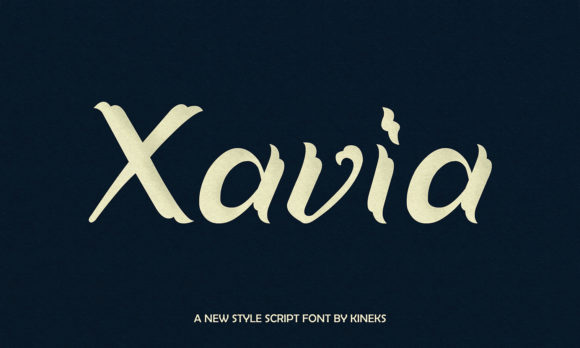
Xavia is not just another handwritten font; it is a display typeface designed with movement and flow in mind. Its paint-brushed texture mimics the organic stroke of a real brush, adding a layer of human touch to digital assets. In an era where audiences crave authenticity, this subtle imperfection creates an emotional connection that sterile, geometric sans serif fonts often miss. The flowing nature of the script suggests creativity, fluidity, and approachability, making it an excellent choice for lifestyle brands, beauty products, coaching services, and creative agencies aiming to project a warm yet professional image.
Elevating Social Media Graphics and Campaign Visuals
The primary battlefield for modern marketers is the social feed. Here, visual consistency is key to building brand recognition. Xavia shines when used for short, impactful text elements that need to stand out against busy backgrounds. Consider using it for Reels covers or TikTok thumbnails. Because the font has a strong vertical presence and dynamic strokes, it remains legible even in small preview sizes, provided you maintain sufficient contrast with the background.
For Instagram posts, Xavia works exceptionally well for inspirational quote graphics or announcement carousels. When paired with a clean, minimal background, the brush strokes become the focal point, drawing the eye immediately to the message. Similarly, on Pinterest, where aesthetics drive clicks, using Xavia for pin titles can significantly increase engagement rates. The font's unique character helps your pins stand out in a crowded grid, signaling to the user that the content is curated and high-quality.
Email marketing also benefits from this typeface. While body text should always remain a highly readable sans serif or serif font, using Xavia in your email headers or call-to-action buttons can inject personality into your newsletters. It breaks the monotony of standard corporate communications and makes promotional emails feel more like personal invitations.
Strategic Font Pairing for Maximum Impact
To unlock the full potential of Xavia, understanding font pairing is essential. A script font should rarely stand alone in a complex layout; it needs a partner to ground the design. The most effective strategy for marketing materials is combining Xavia with a neutral sans serif font. Use the sans serif for captions, body copy, and detailed information, while letting Xavia handle the headlines and emotional hooks. This contrast creates a clear visual hierarchy, guiding the viewer's eye from the most important element to the supporting details.
For a more sophisticated, editorial look—perhaps for a luxury product launch or a high-end service brochure—pair Xavia with a classic serif font. The juxtaposition of the rough, painted brush strokes against the refined lines of a serif creates a tension that feels expensive and deliberate. This combination works wonders for landing pages where you want to convey both creativity and trustworthiness.
Real-World Applications for Brand Growth
Let's look at specific scenarios where Xavia can transform a standard asset into a high-performing one:
- Sale Announcements: Use Xavia to write "Flash Sale" or "50% Off" in large, bold letters over a product image. The energy of the brush stroke conveys urgency and excitement.
- Product Teasers: For a new launch, use the font for mysterious, short phrases like "Coming Soon" or "Something New." The artistic style builds anticipation.
- Webinar Banners: When promoting an online event, use Xavia for the main topic title to make it feel like a masterclass rather than a dry lecture.
- Logo Marks: For personal brands, coaches, or boutiques, Xavia can serve as the foundation for a logo mark. Its distinct style ensures that your brand identity is instantly recognizable across different platforms.
- Seasonal Promotions: During holidays or seasonal shifts, the organic feel of the font adapts well to festive themes without looking cliché.
Readability and Mobile Optimization
While Xavia is visually striking, responsible design requires attention to readability, especially on mobile devices. Script fonts can sometimes struggle on small screens if the text is too long or the spacing is too tight. To ensure your message lands effectively:
- Keep it Short: Limit Xavia to headlines, subheads, or single words. Avoid using it for paragraphs or long sentences.
- Increase Size: On mobile banners and stories, err on the side of larger font sizes to preserve the integrity of the brush details.
- Check Contrast: Ensure there is a stark difference between the font color and the background. A dark brush stroke on a light background (or vice versa) is crucial for fast-scrolling users.
- Use All Caps Carefully: Depending on the specific glyphs, all-caps settings in script fonts can sometimes reduce legibility. Test both title case and all-caps to see which offers better clarity for your specific design.
Licensing and Commercial Use
Xavia is categorized under Freebies, making it an accessible resource for startups, freelancers, and small business marketing teams operating on a budget. However, "free" does not always mean "unrestricted." Before integrating Xavia into client campaigns, merchandise, or digital products for sale, it is vital to review the specific commercial licensing terms. Some free fonts are licensed strictly for personal use, while others allow commercial application with attribution. Ensuring you have the correct license protects your brand and your clients from potential legal issues down the line. If you plan to use this creative font in a logo that will be trademarked or in a template you intend to sell, double-check the designer's guidelines regarding redistribution and modification.
Incorporating Xavia into your design toolkit offers a strategic advantage. It allows you to produce social media graphics and digital ads that feel crafted rather than generated. By leveraging its paint-brushed aesthetic, you can create a visual language that resonates with audiences seeking authenticity. Whether you are refreshing your brand identity, designing a new web design header, or crafting the perfect YouTube thumbnail, Xavia provides the stylistic flair needed to make your content stop the scroll and drive action.